An alarm for iPhone
Stop snoozing.
Win the morning.
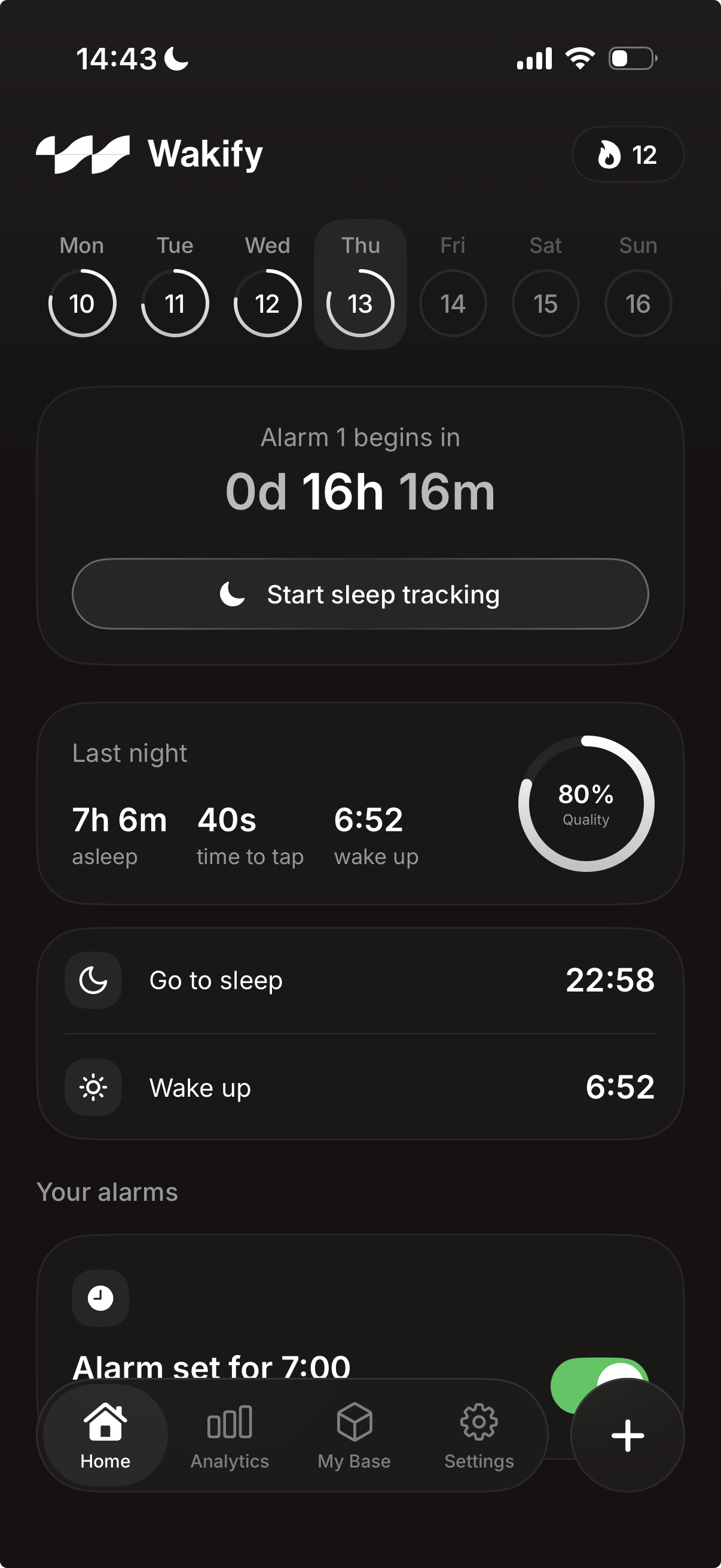
Wakify is an alarm that keeps ringing until you’ve proven you’re up. Give it a mission, like sums to solve, an object to find or reps to do, and it only stops once the mission is done. No snooze, unless you switch it on.
Why it works
The snooze button
is the problem.
Nine more minutes rarely makes a morning better. Wakify takes the easy way out off the table: snooze is off unless you switch it on, the alarm gets louder the longer you leave it, and closing the app brings it straight back. What is left is the thirty seconds of effort that separate a morning you won from one you lost.
Blocks your escape hatches
Reaching for the same three apps instead of getting up? Wakify can shield them from the moment the alarm rings until a few minutes after you've beaten it.
A streak worth protecting
Every morning you win adds a day. Miss one without a streak freeze left and it's back to zero.
Sleep tracking that stays yours
It records and scores your night, snore detection and all, and not a single byte of audio ever leaves your phone.
The missions
Pick what gets you out of bed.
A snooze button asks nothing of you, so you give it nothing back. A mission asks for thirty seconds of real effort — and thirty seconds is all it takes to be properly awake.
Scan a barcode
Scan the barcode on something across the room, like the coffee or the toothpaste. You can't do it from under the duvet.
Solve the maths
Sums hard enough that a half-asleep brain can't bluff its way through. Set the difficulty yourself.
Hunt an object
Photograph something specific somewhere else in the house. You can't do it lying down.
Do the reps
Physical activity, counted by the phone. The fastest way from horizontal to properly awake.
The alarm keeps ringing through Silent and Do Not Disturb until the mission is done.
How it works
Five steps. One of them is hard.
01
Set your alarm
Time, days, sound. The part you already know how to do.
02
Pick your mission
Choose the thing your future self will thank you for. Make it slightly harder than feels reasonable.
03
It rings
Through Silent. Through Do Not Disturb. Louder the longer you leave it, and snooze stays off unless you switched it on.
04
Complete the mission
Do the reps, take the photo, solve the sums. The alarm stops the moment you've proven you're up.
05
Win the morning
The streak goes up. Do it again tomorrow, and the tomorrow after that, until it stops being a decision.
Why Wakify
One job.
Done properly.
Wakify does one thing: it gets you out of bed. Not a habit suite, not a wellness platform, not another dashboard to check. An alarm that holds the line on the one morning a month you’d otherwise fold.
Discipline, not gentleness
Every other alarm is designed to be dismissed. Ours is designed to be beaten. That difference is the whole product.
Details you feel
The haptics, the timing, the copy, the way the screen settles. The stuff you don't consciously notice until it's missing.
Your night stays private
Sleep audio is processed on your device and never uploaded. No ads, no data brokers, nothing sold. Ever.
Built to last
Native, fast, and light on the battery. Performance and privacy are features here, not footnotes.
FAQ
Questions,
answered.
Most of them are some version of “wait, I really can’t turn it off?”
What is Wakify?
An alarm clock for iPhone that keeps ringing until you've proven you're up. Instead of a snooze button, Wakify gives you a mission, like sums to solve, an object to find or reps to do, and keeps ringing until you've done it.
Can I really not snooze it?
Not unless you want to. New alarms have no snooze. You can switch on a single five-minute snooze for an alarm, and it works once each time that alarm rings. The alarm rings through Silent and Do Not Disturb, gets louder the longer it goes, and comes back if you close the app. The way out is the mission.
What if there's a real emergency?
Wakify is an alarm clock, not a hostage situation. If a mission can't be done, a Dismiss link appears once the alarm has rung for ten minutes. Force-quitting the app will not stop it: the alarm comes back within seconds. You can always turn the phone off. Wakify is not built for mornings where oversleeping would be dangerous, so keep a second alarm for those.
Can it stop me reaching for other apps?
Yes. Switch on Block apps for an alarm and your distracting apps are shielded from the moment it rings until the number of minutes you chose after you've beaten it.
Does it track my sleep?
It can record and score your night, snore detection included. All of it is processed on your iPhone, and not a single byte of that audio ever leaves the device. Wakify is a wellness app, not a medical device: its sleep scores and stages are estimates, not a diagnosis.
What happens to my data?
Sleep audio stays on your phone. We run no ads and sell nothing to data brokers. The privacy policy sets out exactly what is stored, who processes it and how to delete it.
Which devices does it work on?
iPhone, at launch. The minimum iOS version will be on the App Store listing.
When can I get it?
Wakify isn't in the App Store yet. Email info@core-creatives.com and we'll let you know the day it is.
What will it cost?
We'll publish the pricing on the App Store listing at launch.
Where can I get help?
The support page at wakify.co/support answers questions about alarms, missions, sleep tracking, subscriptions and your data, and lists every way to reach us. Or email info@core-creatives.com.
Wakify is on its way.
It isn’t in the App Store yet. Leave us a line and you’ll hear from us the day it is.
Questions or press: info@core-creatives.com · Privacy Policy · Terms of Use